Free Photo to Coloring Page Converter
Turn a family photo, pet picture, or vacation snapshot into a printable coloring page. Tune the line detail and darkness, then download and print.
Processed in your browser. Your finished design is only uploaded when you add a product to your cart.
Copyright Notice*
I confirm that I own or have permission to use the uploaded or customized content and understand that I'm responsible for any copyright or trademark issues.
(See Terms & Conditions).
Tap to take or upload a photo
Confirm the copyright notice above to choose your photo.
Before and After
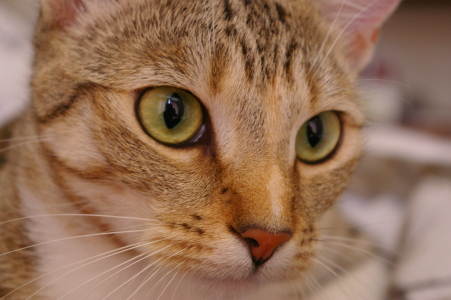
Real photos processed with this converter. Both examples use line detail at 50% and line darkness at 65% of the slider range, with a white background.
Original
Converter Output
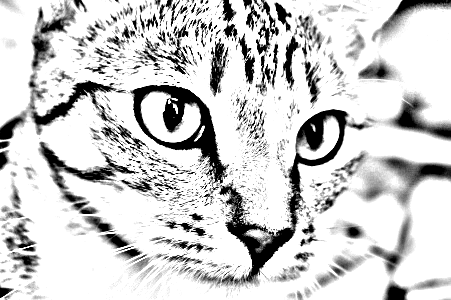
A Clear Subject With Fine Texture
The eyes and nose stand out, but fur still produces many small marks. Higher detail gives finer lines; it does not guarantee fewer of them.
Original

Converter Output

A Detailed Background
The cup is recognizable, but the wood grain remains. Lower darkness lightens the marks without removing the background.
Try These Quick Adjustments
- Cluttered Background
- Crop away distractions before uploading, or try a simpler photo. The converter also draws background texture.
- Faint Outlines
- Increase line darkness and check the preview. If a feature is still missing, try a clearer photo with stronger contrast.
- Too Much Detail
- Move line detail to compare broader and finer lines. Fur, foliage, and other textures may remain at either setting; a simpler photo can help.
Download your coloring page for free, or select Shop Now to explore the available products. Your finished design is uploaded only when you add a product to your cart.
How It Works
Three steps from photo to crayon-ready page.
Drop In Your Photo
Pick any JPG, PNG, or WebP straight from your camera roll or computer. Your photo is processed in your browser without uploading it.
Tune the Lines
Line detail changes the fineness of the lines; line darkness makes them lighter or darker. Watch the preview update as you drag.
Download and Print
Save your PNG, then choose the paper size, orientation, and fit-to-page setting in your print dialog.
Coloring Pages From Your Own Photos
Store-bought coloring books are full of strangers. A coloring page made from your own photo - the family dog, grandma's house, last summer's beach day - turns coloring time into something personal. Kids spot themselves in the lines immediately, and finished pages make sweet fridge art and grandparent mail.
Start with a clear photo where the subject stands out from the background. Contrast, lighting, and background detail all affect the result. Adjust line detail and darkness while watching the preview to find a useful balance for your photo.
If your family enjoys making things from photos, a custom photo puzzle is another hands-on activity built from a picture you love, and every other format is in our personalized photo products collection.
Frequently Asked Questions
- The tool converts your photo to grayscale, finds the edges where brightness changes - outlines of faces, buildings, pets - and redraws them as dark lines on a white page. The line detail slider controls how fine those edges are, and the line darkness slider controls how boldly they print.
- Photos with clear subjects and good contrast: a portrait against a plain wall, a pet on a light floor, a house, a favorite toy. Busy backgrounds turn into busy lines, so simpler scenes color better. The sliders change the lines, but do not remove the background.
- Download your result as a PNG. It keeps your photo's proportions, with the longest edge capped at 2,000 pixels. Smaller images are not enlarged. The file is not automatically laid out for Letter or A4 paper. Choose portrait or landscape to match the image, select your paper size, and use fit-to-page. Check the print preview for margins and sizing; results depend on the source image, print size, and printer.
- Only if you choose to. The photo is read and converted entirely inside your browser, and nothing is uploaded while you're tuning the lines. If you choose Shop Now, your finished design is uploaded when you add a product to your cart, before checkout. Opening Shop Now does not upload it.
- That is what this tool is best at. Kids love coloring people and places they recognize - themselves, grandparents, the family pet, their own house. Make a page per family member, or a batch from a vacation's photos for a rainy-day activity.
- Try lower line darkness and higher line detail for a lighter, finer result. The effect depends on your photo: textures and shaded areas may remain, so check the preview before downloading.
More free photo tools
All our tools run right in your browser. Browse them all on the free photo tools page.
Cookie Consent
We and our partners, including Shopify, use cookies and other technologies to personalize your experience, show you ads, and perform analytics, and we will not use cookies or other technologies for these purposes unless you accept them. Learn more in our Privacy Policy.